The Sunday night planning problem teachers know too well
It’s late on a Sunday evening. A lesson plan is open on your screen, surrounded by tabs—standards, last year’s slides, half-edited activities. You know what you want students to learn, but translating that into objectives, activities, and assessments takes more time than you have.
This is where GenAI in teaching has started to appear in everyday practice. Not as a sweeping change, but as a quiet support during planning. The question most teachers are asking is straightforward: does it genuinely help, or does it create more work?
LEARN: The New Face of Learning: How AI in Education Is Empowering Students and Teachers in 2025
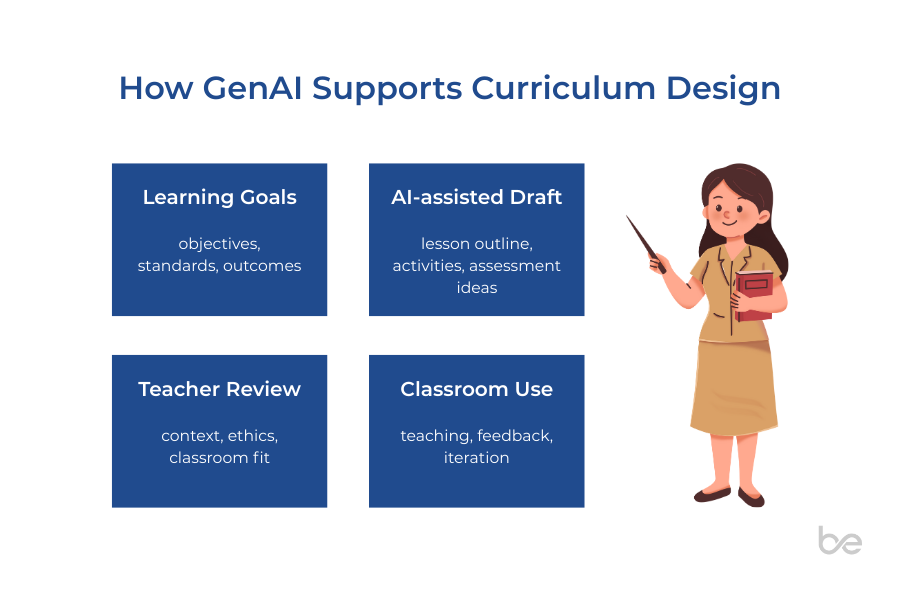
Research and early classroom use point to the same conclusion. GenAI is most useful when it supports drafting and alignment, while teachers continue to make instructional and assessment decisions.

Table of Contents
Where GenAI Fits in Course Planning
Across recent studies and education guidance, GenAI shows consistent strengths in early-stage planning tasks. It can help shape objectives, outline lessons, and suggest variations. The quality of the outcome depends on how clearly the task is framed and how carefully the output is reviewed.
In practice, GenAI tends to fit best into a familiar planning rhythm: clarifying course objectives, sketching lesson structure, adapting for different learners, and drafting assessments. When used this way, it shortens the distance between an idea and a usable plan.
READ MORE: AI Formative Assessment in 2026: Supporting Learning Without Replacing Teachers
Where GenAI in Teaching Is Actually Useful
GenAI is not equally helpful in every part of teaching. Its value becomes clearer in specific areas of course planning where drafting work is repetitive but still important.
1. Writing Course Objectives
Clear objectives remain the foundation of any course. GenAI can help draft objectives that align with common frameworks when given enough context.
For example, a teacher might prompt:
Create three course objectives for a Grade 9 science lesson on cell structure, aligned to Bloom’s Taxonomy
Constraints: 45-minute lesson, mixed-ability class
Output: objectives and success criteria (“students can…”)
Used this way, GenAI helps teachers start with objectives that already point toward assessment, rather than revising them later.
2. Structuring Lessons
Lesson structure is another area where GenAI can reduce planning time. A first-pass outline gives teachers something concrete to evaluate and refine.
A typical prompt might look like:
Build a lesson outline for this topic using a guided inquiry model.
Include timing, teacher actions, student tasks, and common misconceptions.
The outline itself is not the lesson. It is a draft that supports professional judgment.
3. Differentiating Within the Same Course
Differentiation often falls by the wayside when time is tight. GenAI can generate task variations anchored to the same objective, making differentiation more feasible within a single course.
For instance:
Create three versions of a task for this course objective: support, core, and extension.
Include sentence starters and one challenge constraint.
This keeps learning goals consistent while offering different entry points.
4. Designing Assessments That Show Understanding
Assessment design becomes more important as AI-generated answers become easier to produce. Prompts that require explanation, reasoning, and comparison tend to surface understanding more clearly than recall-based questions.
Teachers experimenting with GenAI often use prompts such as:
Write assessment questions that require students to explain or justify their answers.
Include oral prompts, scenarios, and compare-and-explain questions.
This is also where better-ed fits naturally. When students explain their thinking out loud, teachers hear how ideas are formed, not just what answers are submitted. better-ed supports this kind of conversational, voice-based assessment while keeping teacher judgment central.
RELATED: Reimagining Oral Assessment: Proven Frameworks for Better Learning with better-ed
5. Reviewing AI-Generated Materials
Even well-framed prompts need review. GenAI outputs benefit from a quick check for level, clarity, and bias before they are used in a course.
A simple review prompt might be:
Review this lesson for alignment, cognitive level, and clarity for language learners.
Suggest specific edits.
This step keeps planning efficient without sacrificing quality.
Choosing Tools That Fit Course Planning Workflows
Some teachers prefer general GenAI tools because they are flexible. Others use education-focused tools because templates reduce setup time. The difference often comes down to where effort is spent during planning.
| Aspect | General GenAI Tools | Educator-Focused AI Tools |
| Starting Point | Open-ended prompts | Teaching templates |
| Course Alignment | Depends on prompt quality | Built around teaching use cases |
| Setup | Manual prompt design | Guided workflows |
| Teacher Role | Steering and refining | Reviewing and contextualizing |
| Primary Effort | Defining context | Applying judgment |
In both cases, teaching decisions remain human.
Designing Courses With Intent
GenAI will continue to influence how courses are planned. Its impact depends on how deliberately it is used.
When teachers apply GenAI to drafting and alignment tasks, planning becomes more manageable. Time saved can be spent on feedback, discussion, and improving how students demonstrate understanding.
That shift, rather than the tool itself, is where GenAI in teaching becomes meaningful.
–
At better-ed, we’re exploring how conversational, voice-based assessment can support this shift—helping teachers hear student understanding while keeping judgment firmly human.